Introduction
Git is a modern distributed version control system. It is a much useful tool for source code management. This helps in tracking the changes done to a code in a software project on its progress. It is free and open source tool.
Why do we need git?
Let’s say you are working on a software project and you made some changes to the code….may be you did some minor changes ..or may be a lot of such minor changes. Next when you run it or try to compile it, it doesn’t give the expected outcome…Instead it gives you something totally unexpected.
So now what?..go back to the code and undo all the changes?? or maybe just start all over from the beginning?
Both of the above options are helpful only if you have a lot of time still remaining to complete your project. But most of us don’t.
As a third option, what if you can revert (rollback) all the changes you did and start to code again from that point onwards. Now this sounds like a better option. But how to do that? This is where a version control system like Git would be handy to have in use.
With a version control system like Git, you can save different versions of your project over the time along with different changes done with its progress.
But we can save a copy of the project before we change the code, isn’t it the same thing now?
Well’ not exactly. A version control system will save only the changes you do to the code in a local repository (a repository is data structure used by Git to store these changes done along with the time and other details like by whom it’s done).
It will not save another project. (If that so, how many copies and how many times will you have to do that?)
Besides that you can revert your project to previous versions, there are many related such advantages in using Git in your local machine.
· Enables comparing differences between two (or more) versions of your code.
· Can review the history of your code.
· Can add new features to your project without interfering with working code.
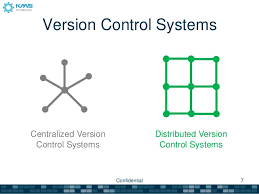
As mentioned above at the very beginning of this blog, git is a distributed version control system, which enables a group of people to work on a single project collaboratively sharing their code, but without making unexpected changes or damages to another person’s code.Unlike a centralized version control system,users can work much independently with a distributed version control system.
But how is that even possible when everybody is working on one project?
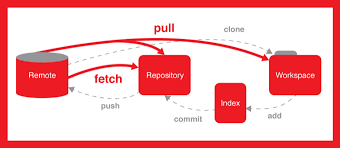
The remote repository is the place where all your colleagues add different parts of the project work. In git, collaborators working on a single project can get a copy of the project saved to their local repository from the remote repository.
You can do any changes to your code and save them to your local repository. (This includes all the additions and deletions to your code). You don’t need to connect to internet and access the remote repository all the time to do your work. After you are happy with your work you can add the final code in your local repository to remote repository.
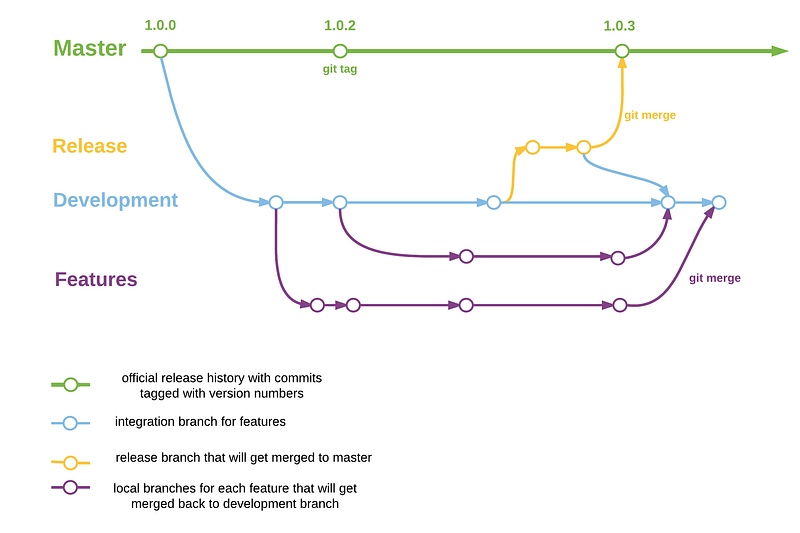
Different branches can be created to save your work independently in the remote repository before integrating your work with work of other collaborators working on different parts of the same project. This is done by branching, which is allocating a space to store individual work of each collaborator in a remote repository.This is a huge advantage because it will prevent any conflicts between different versions of a single file created by many people.
So is that all git is useful for? Nope there is much more. Here’s another one.
Now that all collaborators have completed their individual parts, you want to merge or integrate all of that into a single project. But still there will be conflicts when doing it right?
Git also gives an easier approach to resolve these merge conflicts, by allowing a user to compare the codes in the file so that the user can decide which changes to save and which changes to discard.You can find more useful video tutorials on git here.
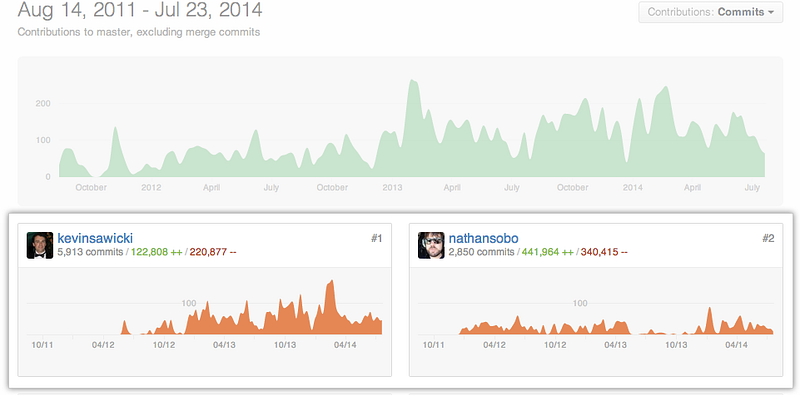
Further when working collaboratively and saving your work,with git you can track changes done to the code as well as who did it, at which time.Owing to this reason git can be handy as a tool in software project management.
you can use Gitbash in windows to execute git commands.Also you can change your terminal used in many IDEs to execute git commands.(that is you need not necessarily switch to git bash to execute git commands)

No comments:
Post a Comment