Tuesday, 24 September 2019

OAuth Authentication

Authentication using a third party app


Although this article is about authentication using a third party app, I would like to clear out two misconceptions which are related.

So first question to go, is Authentication and Authorization the same?

No, they are two different things

1. Authentication is the process of proving or confirming something to be true, valid, or genuine (confirming it's actually me). In other words, authentication verifies you are actually who you say you are.

2. Authorizing-giving official permission/ approval. Authorization decides if you really have permission to access the resource. Act of authorizing is authorization

And last but most important to know,

3. Authorization occurs after identity of a person is successfully authenticated.


So next question in is, What is OAuth ?

OAuth is an Authorization protocol.

OAuth allows the user, to give another website/service or another third party application, a limited access authentication token for authorization to additional resources. This is done via an authentication provider that the user has previously successfully authenticated with. Here instead of directly sharing password or users login credentials it issues an authorization token. This token allows a third party to access user data with restrictions. This means the user can control on what data that is accessible to the third-party app and what is not. Note that here, the third party app will not be able to perform same actions as the user, even though it has the access token.

Some popular authentication providers are
  •          Facebook Authentication Provider
  •          Google Authentication Provider
  •          OAuth Client
  •          GitHub
  •          GitLab
 and many more to go , you can find a complete list here https://en.wikipedia.org/wiki/List_of_OAuth_providers

Now I would like to go ahead to explain you the authentication process by an authentication provider. First let’s identify the participants of this process.

1.      Resource Owner
2.      Client application
3.      Authorization server
4.      Resource server

Client app is the one who wants to gain access to a protected resource. Authorization server issues access tokens to client app. Google, face book, GitHub are some examples for authorization server. Resource server issues the users’ data if owner authorizes it. eg: Dropbox, google drive ,GitHub repository . In most of the time both the authorization and the resource server are of same trust domain just like in the example here.

In this example I have used ‘GitHub’ as the authentication provider and an app named ‘Mickey Mouse’ as the client app.


Practical Guide for Using an Authentication Provider
1.In GitHub, go to your account Settings, and click Oauth Applications under Developer Settings.
2. Click Register a new application.
3.  Give a name for Application Name field .I have given it as ‘Mickey Mouse’
4. For Home page URL give the full URL to your application homepage. I have given http://localhost:4000/  because I run this in localhost. You can give anything you want here.
5.  For the Authorization callback URL, enter http://localhost:4000/home . This is the redirection url. From this place after authentication, client application is redirected to this url given here.
6.      Finally Click on the Register application button at the end of the form.

following image shows how my one looked like

resulted App


After the app is registered, it generates a Client ID and a Client secret


Server side implementations for authentication process and validation is available here.

After It is implemented as in the code given in above mentioned repository, and following the instructions in that git hub repository will result in the following.


Authentication screens will look like following. Since the user is Not signed in first It first asks the user to authenticate by asking the user name and password.

Next it asks the user to Authorize (or give permission to) the Mickey mouse app to access users GitHub repositories.


Once the user clicks on the Authorize Button, The application is redirected to the page where activity of viewing the repository could be done.

So far, I’ve shown some the basic authentication process.(except in the the last image above) I have removed all the styling to make it clear. So this is how it looks with styling.

Notice that once the app is authenticated an access token is passed to the next redirected url


This app allows to extract selected repository details of the user. Further it also allows to visit the repository of the user.


when clicked on one of the links , the user is redirected to the selected repository.


That’s all folks! Please like and comment for any necessary improvements and suggestions


Wednesday, 3 April 2019

Git in Simple ENGLISH!

Introduction


Git is a modern distributed version control system. It is a much useful tool for source code management. This helps in tracking the changes done to a code in a software project on its progress. It is free and open source tool.


Why do we need git?


Let’s say you are working on a software project and you made some changes to the code….may be you did some minor changes ..or may be a lot of such minor changes. Next when you run it or try to compile it, it doesn’t give the expected outcome…Instead it gives you something totally unexpected.
So now what?..go back to the code and undo all the changes?? or maybe just start all over from the beginning?

Both of the above options are helpful only if you have a lot of time still remaining to complete your project. But most of us don’t.
As a third option, what if you can revert (rollback) all the changes you did and start to code again from that point onwards. Now this sounds like a better option. But how to do that? This is where a version control system like Git would be handy to have in use.
With a version control system like Git, you can save different versions of your project over the time along with different changes done with its progress.

But we can save a copy of the project before we change the code, isn’t it the same thing now?
Well’ not exactly. A version control system will save only the changes you do to the code in a local repository (a repository is data structure used by Git to store these changes done along with the time and other details like by whom it’s done).
It will not save another project. (If that so, how many copies and how many times will you have to do that?)
Besides that you can revert your project to previous versions, there are many related such advantages in using Git in your local machine.

· Enables comparing differences between two (or more) versions of your code.
· Can review the history of your code.
· Can add new features to your project without interfering with working code.


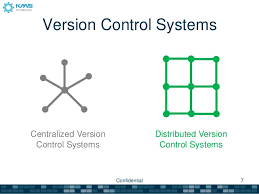
As mentioned above at the very beginning of this blog, git is a distributed version control system, which enables a group of people to work on a single project collaboratively sharing their code, but without making unexpected changes or damages to another person’s code.Unlike a centralized version control system,users can work much independently with a distributed version control system.


But how is that even possible when everybody is working on one project?
In git there you can have remote repository (can use git hub or git labor Bitbucket for much larger projects) and a local repository(in your computer).


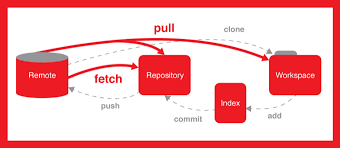
The remote repository is the place where all your colleagues add different parts of the project work. In git, collaborators working on a single project can get a copy of the project saved to their local repository from the remote repository.

You can do any changes to your code and save them to your local repository. (This includes all the additions and deletions to your code). You don’t need to connect to internet and access the remote repository all the time to do your work. After you are happy with your work you can add the final code in your local repository to remote repository.


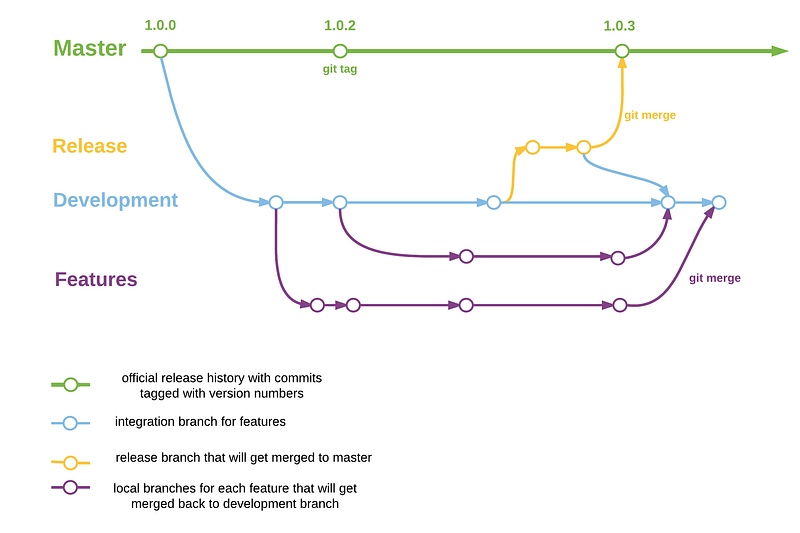
Different branches can be created to save your work independently in the remote repository before integrating your work with work of other collaborators working on different parts of the same project. This is done by branching, which is allocating a space to store individual work of each collaborator in a remote repository.This is a huge advantage because it will prevent any conflicts between different versions of a single file created by many people.

So is that all git is useful for? Nope there is much more. Here’s another one.

Now that all collaborators have completed their individual parts, you want to merge or integrate all of that into a single project. But still there will be conflicts when doing it right?
Git also gives an easier approach to resolve these merge conflicts, by allowing a user to compare the codes in the file so that the user can decide which changes to save and which changes to discard.You can find more useful video tutorials on git here.


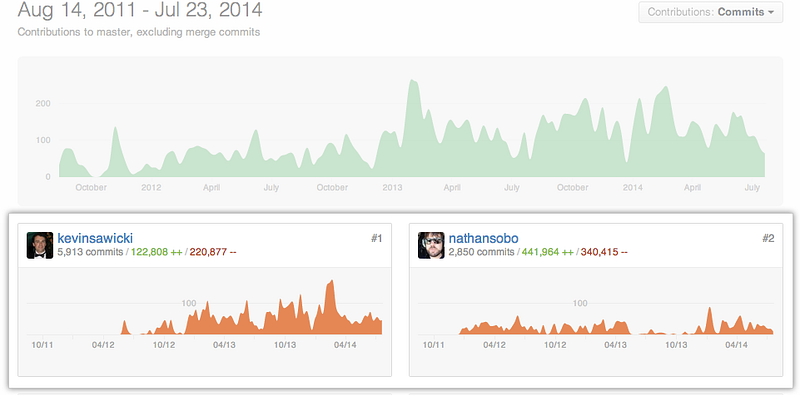
Further when working collaboratively and saving your work,with git you can track changes done to the code as well as who did it, at which time.Owing to this reason git can be handy as a tool in software project management.

you can use Gitbash in windows to execute git commands.Also you can change your terminal used in many IDEs to execute git commands.(that is you need not necessarily switch to git bash to execute git commands)